
iPod Drop
Drag and drop music onto your classic iPod from your Mac. No iTunes, no syncing, no fuss.
Free and open source · macOS 14 Sonoma or later · Apple silicon
See it in action
Screenshots use a demo library with made-up artists and silent tracks.
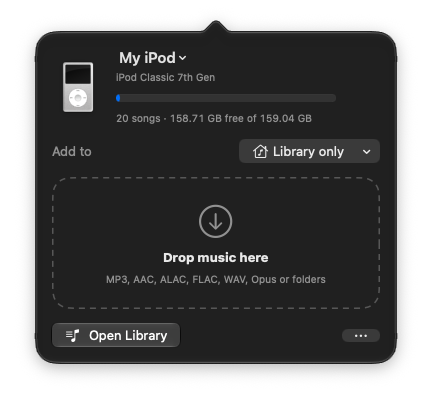
Drop music on the iPod icon in your menu bar
iPod Drop lives at the top of your screen. Drag songs or whole folders onto its icon and they're on your iPod, no window needed.
- Choose a playlist to drop into, or make a new one
- See your iPod's model, songs and free space at a glance
- Progress shows right next to the icon
Grab song info and cover art in one click
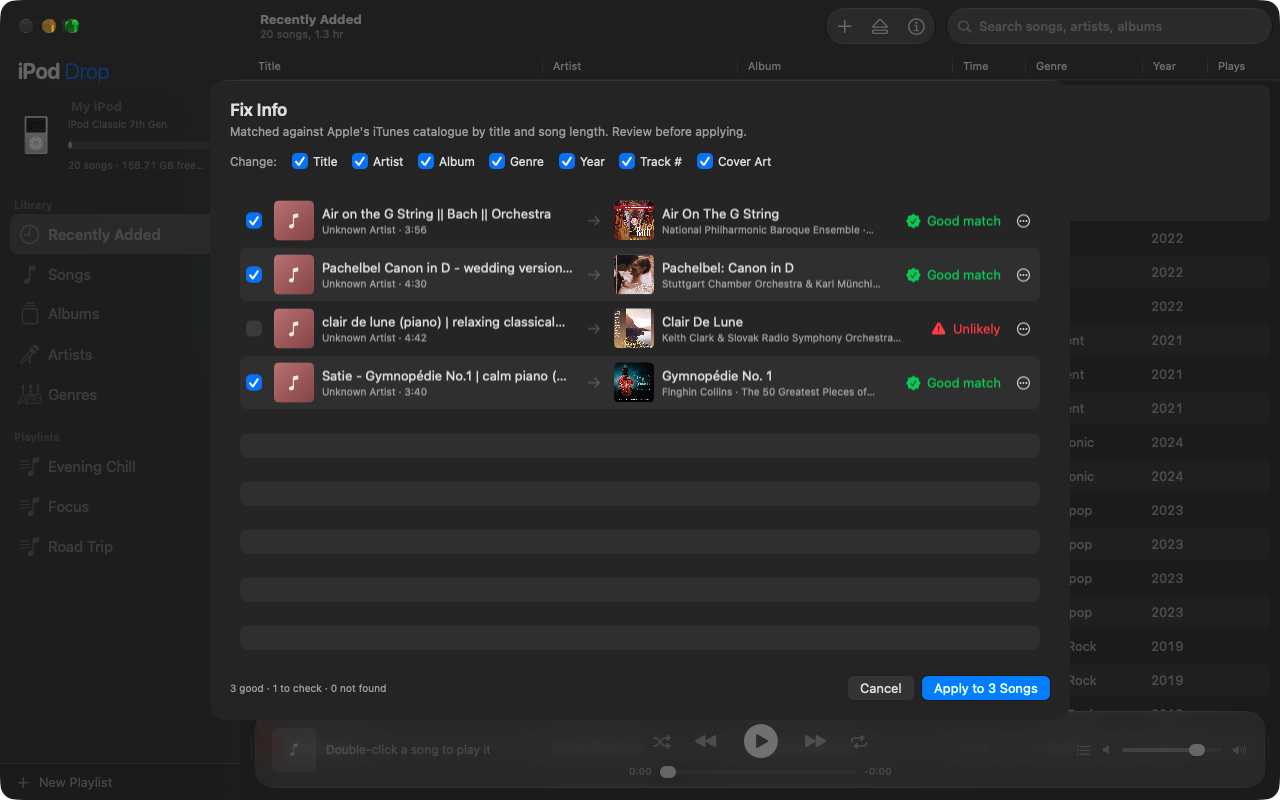
Songs with messy titles like "Bach || Orchestra (Official Audio)"? Fix Info looks them up in Apple's music catalogue and suggests the real title, artist, album, year and cover art.
- Matches by title and song length, so the right recording wins
- Doubtful matches are flagged and left unticked
- Nothing changes until you review and apply
- Run it on your whole library and fill in only what's missing
Browse your iPod like a music app
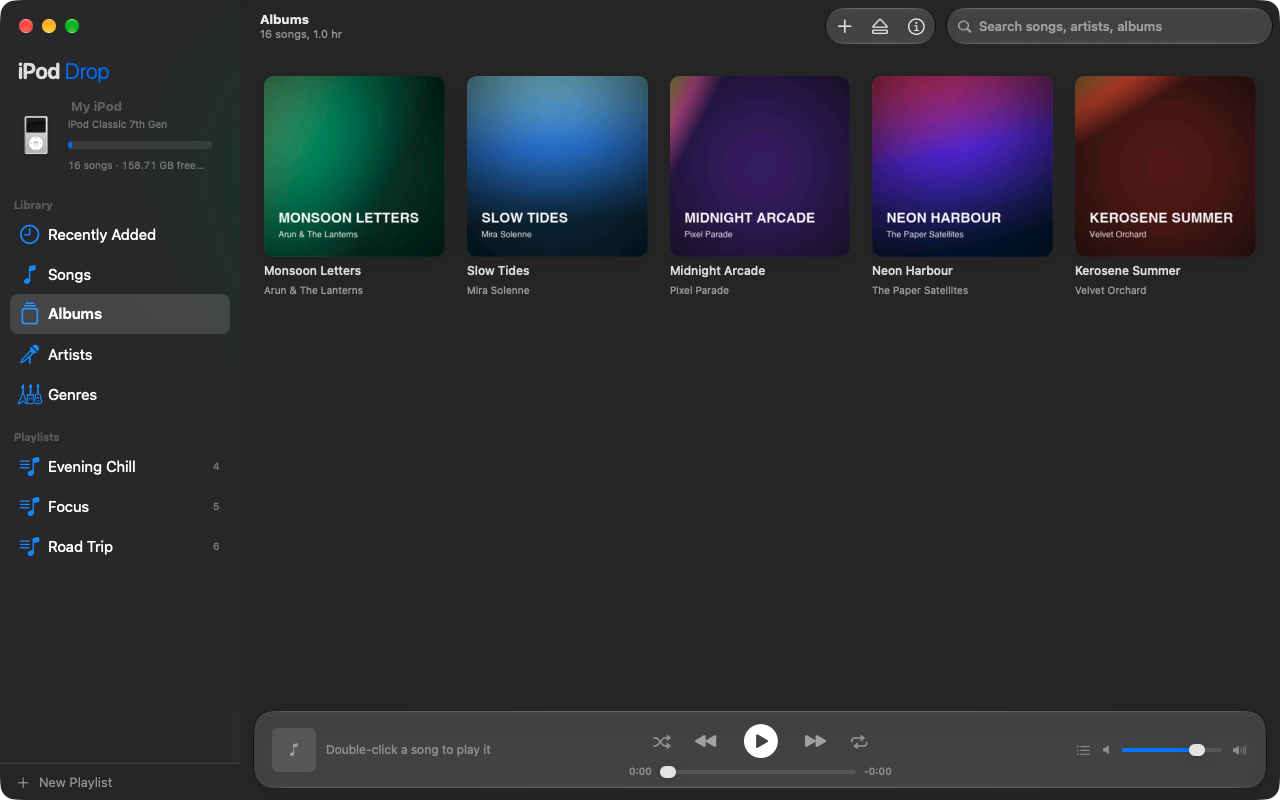
Albums with cover art, artists, genres and playlists, plus a built-in player that plays straight from the iPod. Right-click anything for every action.
Everything your iPod needs
A native Mac app that lives in your menu bar, with a full library window when you want it.
Drag and drop
Drop songs or whole folders on the menu bar icon or the library window, straight into any playlist.
Any format
FLAC, WAV, Opus and more are converted automatically. Lossless stays lossless as Apple Lossless.
Manage your library
Browse songs, albums, artists and genres. Create playlists, edit song info and remove songs.
Fix Info
Fill in titles, artists, albums, genres, years, track numbers and cover art from Apple's catalogue, for a few songs or your whole library. You review every change.
Built-in player
Play songs right from the iPod, with Up Next, shuffle, repeat and your keyboard's media keys.
Safe by design
One program writes to the iPod at a time, duplicates are skipped, and ejecting is always clean.
Live progress
See the song being copied, how many files are done out of the total, and the percentage, with an iTunes-style moving bar.
Updates itself
Checks for new versions once a day and installs them when you say so. Updates are signed, so only real releases install.
Recovers interrupted saves
If saving was cut off, restore the previous library or keep what's there, instead of a stuck iPod.
Error reports
If something goes wrong, Help › Send Error Report opens an email with the details and log. You read it before sending.
Works with click-wheel iPods
Mac-formatted and Windows-formatted iPods both work.
| iPod | Status |
|---|---|
| iPod classic (6th, 6.5th, 7th generation) | Works |
| iPod (3rd generation), iPod photo, iPod video (5th, 5.5th) | Works |
| iPod mini (1st, 2nd generation) | Works |
| iPod nano (1st to 4th generation) | Works |
| iPod nano (5th generation) Needs one sync with Finder or iTunes first | Should work |
| iPod nano (6th, 7th generation) | Being tested |
| iPod shuffle, iPod touch | Not supported |
Install in a minute
Works on macOS 14 Sonoma, macOS 15 Sequoia, macOS 26 Tahoe and later, on Apple silicon Macs. iPod Drop isn't notarized by Apple yet, so macOS asks you to confirm the first time.
- Download
iPod-Drop.dmg, open it, and drag iPod Drop into Applications. - Open it once. If macOS blocks it, go to System Settings › Privacy & Security, scroll down and click Open Anyway.
- Stay up to date. From version 2.3, iPod Drop checks for updates by itself once a day; choose iPod Drop › Check for Updates… to check now.
- Install ffmpeg for format conversion:
brew install ffmpeg(using Homebrew). Then plug in your iPod and drop some music on it.
Enjoying iPod Drop?
It's free and always will be. If it brought your old iPod back to life, you can buy me a coffee.
Buy me a coffee